
|
|
#21
|
||||
|
||||
 Re: How to Post Pic in your post
for the slow people
when you post it should look like this [img] addres in here to ther pic, http:// what ever and end like this [/img Left off the last bracket so you can see what I was saying
__________________
1986 V20  Old Fishermen never die, we just SMELL that way!! 
|
|
#22
 04-12-2007, 10:31 AM
|
|||
|
|||
|
Re: How to Post Pic in your post
im still lost boss. ???
|
|
#23
04-12-2007, 02:50 PM
|
||||
|
||||
|
Re: How to Post Pic in your post
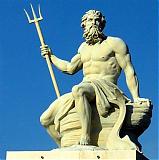
[IMG]http://i52.photobucket.com/albums/g18/parishht/poseidon_sculp_small.gif[/IMG * * * * (])
This is what the god picture below looks like. The ] *in the parenthesis is actually right after the ending IMG. If you have a photobucket account, http://photobucket.com/ there is a box under your picture that says IMG code, click in that box and it will hilite the code. Then right mouse click the code and say copy. Then paste the code into your post. In the photobucket account, there is an option to change the size of your picture, so they don't show up extremely large.
__________________
  Bottom's up!!! Bottom's up!!!
|
|
#24
04-12-2007, 03:32 PM
|
|||
|
|||
|
Re: How to Post Pic in your post
thanks it took me a while (ya know be'n one of the slow ones and all!) thanks
|
|
#26
04-12-2007, 04:56 PM
|
|||
|
|||
|
Re: How to Post Pic in your post
MJ how do ya get to the gallerys ?
|
|
#27
04-12-2007, 05:20 PM
|
|||
|
|||
|
Re: How to Post Pic in your post
I found it!!!!!!!!!!had to go into my favorites and get to it that way, I SURE HATE THIS COMPUTER SOMETIMES ! ! !
|
|
#28
04-18-2007, 12:28 AM
|
|||
|
|||
|
Re: How to Post Pic in your post
__________________
 77 V20 cuddy with 170 I/O Mercruiser 72 16ft. Carolina w/a 25hp Evinrude Last edited by cfelton; 01-13-2008 at 10:07 AM.
|
|
#30
04-18-2007, 01:28 AM
|
|||
|
|||
|
Re: How to Post Pic in your post
Ah-ha Ive got it now! Now if I can figure out how to put pics in my album.
__________________
77 V20 cuddy with 170 I/O Mercruiser 72 16ft. Carolina w/a 25hp Evinrude
|
 |
|
|







 Linear Mode

